OpenClaw vs Hermes Agent vs Krypton: easiest setup
Comparison
| Topic | Krypton | OpenClaw | Hermes Agent |
|---|---|---|---|
| License | Apache-2.0 | MIT (OpenClaw Foundation) | MIT (Nous Research) |
| First surface | Chat on web, desktop, and mobile | A gateway into chat apps | A desktop app or a CLI |
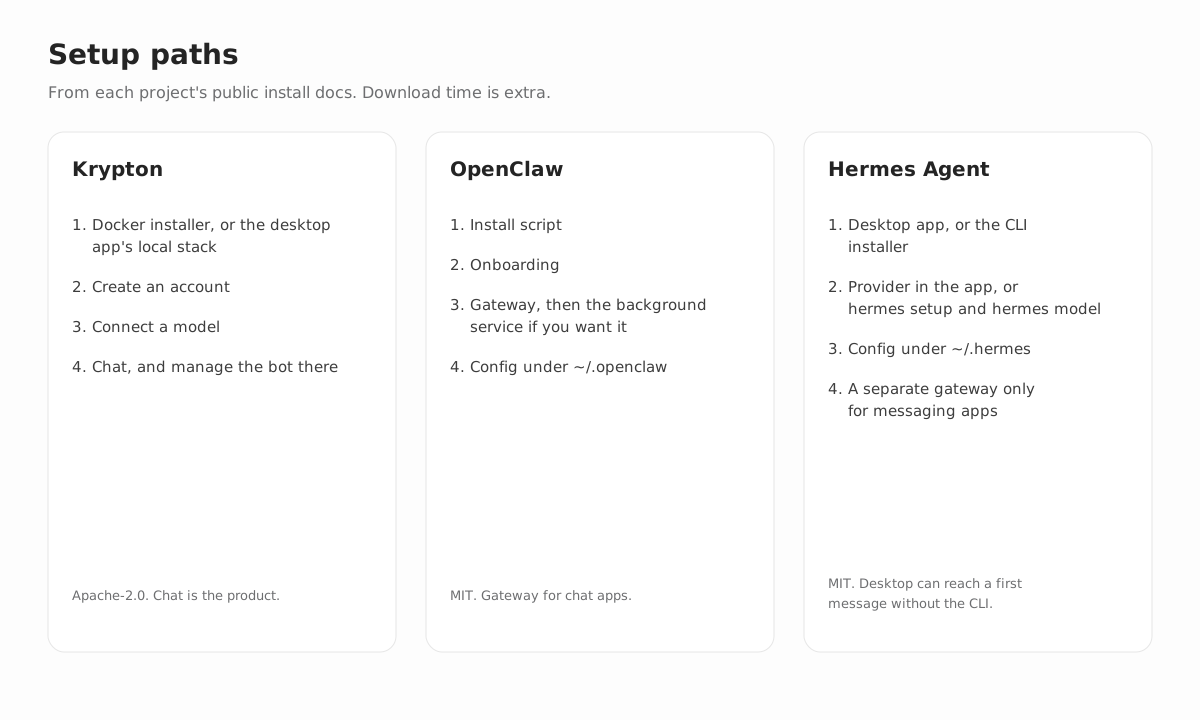
| Install | Docker installer, then account, then model | Install script, then onboarding, then gateway | Desktop app, or install.sh plus hermes setup |
| Config you edit later | The chat itself, plus routines in readable Markdown | ~/.openclaw and openclaw configure | ~/.hermes/.env and config.yaml, or the desktop settings |
| Sandbox default | A Docker computer out of the box | Sandboxing off unless you enable it, per the docs | A local backend inside the desktop app |
OpenClaw vs Hermes Agent vs Krypton: people want to know which open source agent is easiest to set up. The truthful answer is that these are not three installers for one product. Krypton is a chat application built around persistent bots. OpenClaw is a gateway that plugs your chat apps into an assistant running on your machine. Hermes Agent is a desktop app plus a command-line agent sharing one config directory, with a messaging gateway you launch when you want Telegram, Discord, Slack, and similar apps.
You can run any of the three on hardware you control, and each one sends prompts to whichever model provider you configure. Nothing here is a timed benchmark; the steps listed are the ones each project documents itself.
What “easiest to set up” really means
A one-line install command does not guarantee an easy first week. The better question is: once the first reply arrives, where will you be managing this agent?
You want a named bot in an app. If the goal is a bot with its own name, computer, and readable routines, available in web, desktop, and mobile apps, Krypton leaves you the least to maintain over time. Install with Docker, then work in chat.
You want an assistant inside your existing chat apps. If you spend your day in Discord, Telegram, WhatsApp, Slack, Signal, or iMessage and want a single process on your machine behind all of them, the OpenClaw Gateway is exactly what that project is designed for. That shape costs you onboarding, a background service, and a config file.
You want a native desktop agent. The Hermes docs present the desktop app as a first-run route that needs no CLI. The quickstart still teaches the CLI, and messaging platforms run as yet another process. Saying Hermes takes “more steps” than Krypton overlooks the desktop guide; saying Krypton takes “more steps” than Hermes overlooks Docker and account creation. Pick the install by the surface you want.
Krypton: a chat app for persistent AI bots
Krypton is licensed Apache-2.0. Deploy it on any machine you control, either from the published Docker images or from a source checkout. The desktop app can either start that stack on your own computer or point at a server that is already running. Krypton Cloud, the hosted version, is in beta.
Install
The published-image installer is a single script you run in an empty directory. It generates .env with random secrets, pulls the images, and brings up the API, the worker, Postgres, and a Docker computer. Then you open the app, sign up, and connect a model; whoever registers first becomes the deployment owner. After that, everything is chat: each new bot starts by interviewing you, its routines are written in Markdown, it can pause for your approval, and their actions are written to an audit log you keep.
Models and computers
Supported models include OpenAI, Anthropic, Google, Vercel AI Gateway, any OpenAI-compatible endpoint, and local servers such as Ollama, LM Studio, llama.cpp, or MLX, with a different model per bot if you like. Local Docker is the default computer, and E2B, Daytona, CreateOS, and Boat are optional. You can also opt into a desktop provider that runs straight on the host, though Krypton never selects it by default.
Connectors and cost
Optional connectors cover Slack, WhatsApp, Telegram, iMessage via Sendblue, and Feishu/Lark. They are not your main way of talking to a bot; the web, Electron, and Expo apps are.
The software carries no seat fee. Your spend goes to models, hardware, and whichever remote computer you enable (hosted plans are on the pricing page). How long the image pull takes varies. For the exact commands, see the self-hosted AI agent page; the step-by-step install guide explains what its ten-minute headline does and does not promise.
OpenClaw: a self-hosted gateway for chat apps
OpenClaw is MIT-licensed and overseen by the OpenClaw Foundation, described by the project as an independent 501(c)(3). Per the docs, you host the Gateway on your own computer or server, there is no hosted service sitting in between, and the software has no paid tier.
Install
As of October 7, 2026, the install page recommends Node 26 and lists Node 24.16+ or Node 26.1+ as supported. The installer script identifies your OS, can install Node for you, installs OpenClaw, and starts onboarding:
curl -fsSL https://openclaw.ai/install.sh | bashFor a first chat, the Gateway can simply keep running in that terminal. To make it a background service, run openclaw gateway install, which sets it up as a LaunchAgent, a systemd user unit, or a Windows Scheduled Task. Later changes happen via openclaw configure and ~/.openclaw/openclaw.json, and openclaw doctor and openclaw dashboard become part of maintaining the install. Adding a phone channel is its own step.
Channels and interfaces
Chat apps come first. The documented channels include Discord, Google Chat, iMessage, Matrix, Microsoft Teams, Signal, Slack, Telegram, WhatsApp, Zalo, and more through plugins, plus WebChat. There is also a browser Control UI, along with iOS and Android nodes.
Tools and sandboxing
Browser automation and exec are among the tools. The sandboxing docs say sandboxing ships disabled and the Gateway process always stays on the host. Once you enable it, the documented backends are Docker, Podman, SSH, OpenShell, and Crabbox. That default is worth noting if you expected a container; Krypton, by contrast, gives bots a containerized computer unless you pick something else.
Models and features
Model options include Anthropic, OpenAI, and Google, with OAuth for some subscriptions like OpenAI Codex. Self-hosted endpoints include vLLM, SGLang, Ollama, llama.cpp, LM Studio, and other servers compatible with the OpenAI or Anthropic APIs, with failover between them. The project covers sessions, memory, skills, cron, hooks, and plugins. Direct chats may share one main session, while group chats are kept isolated by default.
Your costs are the models and the machine; according to the project, the software has no paid tier.
Hermes Agent: desktop app and CLI from Nous Research
Hermes Agent is Nous Research’s open source agent, MIT-licensed, hosted at github.com/NousResearch/hermes-agent. The project site additionally sells optional Nous Portal credits and cloud hosting. Both are optional; the software runs on your own machine.
Hermes Desktop
According to the desktop guide, the native app runs on macOS, Windows, and Linux and shares config, API keys, sessions, skills, and memory with the CLI under ~/.hermes/. The guide says first-run onboarding reaches a first message within seconds, and Choose provider later skips provider setup. Settings cover providers, models, tools, credentials, MCP servers, the gateway, and sessions. The app runs its own local hermes serve backend, so chatting there does not depend on the CLI or the web dashboard.
Hermes CLI
The CLI is a separate route, and it is where the quickstart spends most of its time. On Linux, macOS, and WSL2 you run an install.sh script; on Windows, a PowerShell script. Next, hermes setup offers Quick Setup with Nous Portal, Full Setup, or Blank Slate, and hermes model selects a provider. Secrets are stored in ~/.hermes/.env and everything else in ~/.hermes/config.yaml. Start your first terminal chat with hermes or hermes --tui.
The quickstart’s provider list is long: Nous Portal, OpenAI, Anthropic, Google, a custom OpenAI-compatible endpoint, and local servers like Ollama and LM Studio, among others. It requires a model with at least 64,000 tokens of context. That minimum belongs to Hermes, not to Krypton.
Messaging gateway
Telegram, Discord, Slack, WhatsApp, Signal, Email, and Teams are configured through hermes gateway setup and served by a gateway process you launch on its own. The desktop guide notes that this messaging gateway is not the same process as the app’s local backend. Skip it if desktop chat is all you need; run it if you want the bot inside those apps.
Day-to-day maintenance
In daily use, the desktop settings handle providers and sessions. The quickstart’s documented recovery commands are hermes doctor, hermes model, hermes setup, and hermes gateway status. Tool access lives under hermes tools, and cron, skills, and MCP servers each need further configuration.
Nous Research describes Hermes as a self-improving agent that builds skills from experience, remembers across sessions, and can run scheduled jobs. We do not repeat any claim broader than that here; check their docs for what actually ships.
How to choose between OpenClaw, Hermes Agent, and Krypton
Choose Krypton when what you need is a teammate in an app you open: recurring browser and shell jobs, scheduled routines in readable form, an approval step when an action matters, and one bot available on web, desktop, and phone. Setup costs you Docker and an account. After that, you change things by chatting, not by editing a config file every time.
Choose OpenClaw when the assistant belongs inside the chat apps you already use, and you are fine running a Gateway, installing it as a service, and editing ~/.openclaw when settings drift. You have to switch sandboxing on yourself, since the docs say it starts disabled.
Choose Hermes Desktop when a native app matters most and you would rather reach a first reply before learning any CLI. Choose the Hermes CLI when you prefer the terminal, hermes model, and files under ~/.hermes. Bring in the messaging gateway only if those chat platforms are a requirement, and do not count the desktop path and the gateway path as a single step.
Cases that are easy to get wrong
Need a library that builds into your own Python service? You will not find one among these three; that is why LangGraph and CrewAI appear in the best open source AI agents roundup. Want a hosted assistant with nothing to install? Browse the open source alternatives hub, where those products, and their different trade-offs, are covered. For deeper one-on-one comparisons, see the OpenClaw alternative and Hermes alternative pages.
What this comparison does not measure
We did not benchmark cost per token, how dependable the browser automation is, or how often scheduled jobs succeed. Nor does this page claim any project is safer in every setup. OpenClaw with sandboxing enabled carries different risk than OpenClaw without it. Krypton’s Docker computer carries different risk than aiming a bot at a remote VM. Hermes on a local model carries different risk than Hermes on a hosted provider.
These projects also keep moving. Node versions, installer flags, and desktop onboarding all change over time. The sources listed are the pages this comparison was verified against on October 7, 2026, and whenever a command here conflicts with the upstream docs, follow the upstream docs.
FAQ
Does Krypton always take fewer steps than Hermes Desktop?
No. According to the Hermes desktop guide, first-run onboarding can get to a first message in seconds, and choosing Choose provider later skips provider setup. Krypton's published images still have to be pulled and started by Docker before you create an account and connect a model. Choose the install that fits the app you plan to work in.
Is the software itself paid for any of the three?
Self-hosting Krypton is free, and hosted Krypton Cloud is in beta. OpenClaw's docs state there is neither a paid tier nor a hosted service. Hermes Agent is MIT-licensed and additionally documents optional Nous Portal credits and cloud hosting. In every case, models, machines, and any optional computer provider still cost money.
Can I reach all three from Telegram or Slack?
Chat apps are OpenClaw's main surface, via its Gateway. Hermes relies on a messaging gateway, which the desktop guide calls a process separate from the app's local backend. Krypton can attach Slack, WhatsApp, Telegram, iMessage via Sendblue, and Feishu/Lark through optional connectors. Those connectors are add-ons; the Krypton apps work without them.
What sources does this comparison use?
OpenClaw details come from docs.openclaw.ai as read on October 7, 2026. Hermes details come from the Hermes Agent site, its quickstart, and its desktop guide. Krypton details come from the project's self-hosting guide. Double-check those pages before running any command.
Sources
- OpenClaw install docs
- OpenClaw sandboxing
- Hermes Agent quickstart
- Hermes Agent desktop
- Krypton self-hosting guide