Open source OpenClaw alternative
Updated October 7, 2026.
Krypton is an open source OpenClaw alternative whose whole design leans toward simplicity. Like Grok Bot, it is just chat: the same conversation where you set up a bot is where you manage it. OpenClaw is open source and self-hosted as well, but its getting-started guide takes a longer road. You install a CLI, walk through onboarding, keep a Gateway alive in a terminal or as a background service, and maintain a config file.
These are different products, and Krypton cannot import an OpenClaw setup. OpenClaw details here follow OpenClaw's documentation, and Krypton details follow this project. Both evolve, so treat the linked docs as the place to confirm any detail.
- Lives in the Krypton chat
- Docker installer, then you just chat
- Apache-2.0 source
- A gateway for chat apps
- CLI, onboarding, config file
- MIT source
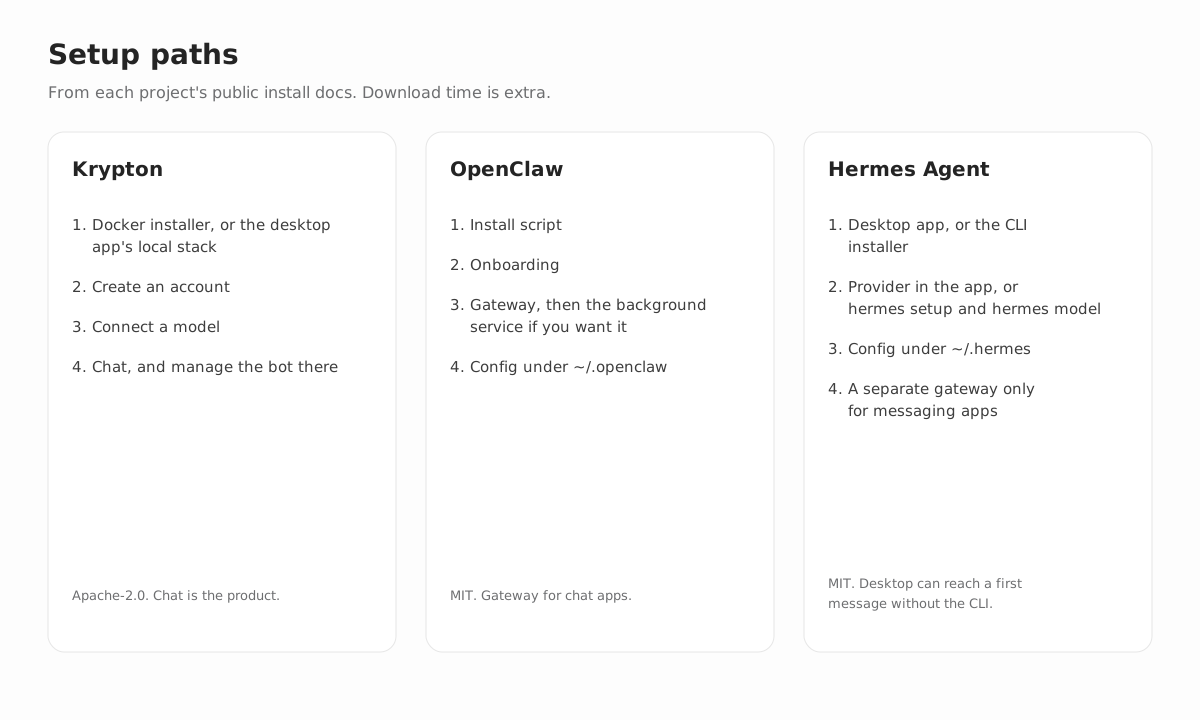
Setup: Krypton vs OpenClaw
Self-hosting Krypton means running the published Docker installer, or letting the desktop app bring up that stack for you. Sign up, connect a model, and the rest is conversation on whichever client you prefer: web, desktop, or mobile. Each new bot opens by asking about the work, you direct it in that same thread, and its routines remain readable Markdown.
OpenClaw's getting-started guide installs its CLI and then launches a wizard. If the machine already holds an API key or is logged in to Codex or Claude Code, Quick start is the fast route. Custom setup goes through the complete flow, and openclaw onboard --classic gives you the step-by-step wizard. Under Quick start, the Gateway keeps running in that terminal till you close it, which lets you chat before installing any service. Running openclaw gateway install later moves it to the background: on Windows a Scheduled Task, on Linux a systemd user unit, and on macOS a LaunchAgent. You then confirm with openclaw gateway status (port 18789, according to the guide) and open openclaw dashboard. Messaging from your phone, Telegram for example, is its own Channels step.
Managing each agent day to day
With Krypton, daily management happens in that same chat on web, desktop, and mobile, and schedules, memory, and approval boundaries stay attached to the bot. Optional connectors can bring in Telegram, Slack, WhatsApp, Feishu/Lark, or iMessage through Sendblue, but you never need them to use the product.
In OpenClaw's docs, later edits happen via openclaw configure or directly in a JSON file (~/.openclaw/openclaw.json by default). openclaw triage and openclaw doctor help diagnose problems. You keep the Gateway process running, whether in a terminal or as the background service, and talk to the assistant mostly through chat apps, plus the Control UI.
Krypton vs OpenClaw, side by side
| Topic | Krypton | OpenClaw |
|---|---|---|
| Setup | Install with Docker, or let the desktop app spin up the stack locally; then sign up and connect a model. After that it is only chat: each new bot interviews you, and that conversation is where you run it. | Install the CLI and pick Custom setup or Quick start. A first chat can run with the Gateway still in that terminal; openclaw gateway install then turns it into a service (Windows Scheduled Task, systemd user unit, or LaunchAgent). Next come openclaw gateway status and openclaw dashboard, with a phone channel as its own step. |
| Day-to-day management | Manage the bot in the same chat on web, desktop, and mobile. Routines are readable Markdown that can run on a schedule, and the bot stops for approval at the boundaries you set. | Edit settings with openclaw configure or in ~/.openclaw/openclaw.json; troubleshoot with openclaw triage and openclaw doctor. Meanwhile the Gateway has to stay up, either in a terminal or as the background service you installed. |
| Product type | Open source software for persistent AI teammates. Each bot remembers its history, conversations, routines, and memory, and works a desktop, shell, and browser. | A gateway you host that connects your messaging apps to an AI assistant running locally, pitched by the project as a single Gateway for every channel you use today. |
| License | Apache-2.0; CloudWish develops it in public. | MIT; stewarded by an independent 501(c)(3), the OpenClaw Foundation. |
| Where it runs | Self-host from the published Docker images or from source; the web, desktop, and mobile apps all talk to that one API. Hosted Krypton Cloud is in beta. | The Gateway runs on your own computer or a server, with no hosted service in the middle according to the docs. Interfaces span companion apps, Android and iOS nodes, and a Control UI in the browser. |
| Interfaces | Krypton's own clients: web, Electron desktop, and Expo mobile. If you want them, optional connectors add Telegram, Slack, WhatsApp, Feishu/Lark, or iMessage through Sendblue. | Mainly through chat apps. The documented list runs from WhatsApp, Telegram, Slack, and Signal to Microsoft Teams, Matrix, iMessage, Google Chat, Discord, and Zalo, with more via plugins and WebChat too. |
| Models | Your keys for Google, Anthropic, OpenAI, or Vercel AI Gateway, or any endpoint speaking the OpenAI API, or a local server (MLX, llama.cpp, LM Studio, Ollama). Bots can each run their own model. | Lots of providers, Anthropic, OpenAI, and Google among them, plus OAuth for certain subscriptions like OpenAI Codex. On the self-hosted side: LM Studio, llama.cpp, Ollama, SGLang, vLLM, and other OpenAI- or Anthropic-compatible servers, with failover. |
| Computers and tools | A graphical desktop with terminal, browser, and files. Bots use Docker on your machine unless you add a remote computer from E2B, Daytona, CreateOS, or Boat. A desktop provider on the host itself is available when chosen explicitly, never by default. | Tools cover browser automation and exec. Sandboxing ships turned off; once it is on, you can choose Crabbox, OpenShell, SSH, Podman, or Docker. Whatever you pick, the Gateway process remains on the host. |
| Routines and memory | Routines live as readable Markdown files, and the product ships with an audit log, approval limits, schedules, and memory. | Plugins, hooks, cron, skills, memory, and sessions. One main session can be shared across direct chats; group chats stay isolated unless you change that. |
| Integrations | Optional Composio or Pipedream catalogs, plus whatever OpenAPI tools, Treg sources, or MCP servers you add. | Skills, channel plugins, web search from several providers, and an SDK for writing plugins. |
| More than one agent | Bots can hand work to peer bots or to short-lived subagents. | Multi-agent routing that isolates sessions per agent, workspace, or sender. |
| Software cost | The open source code is free of seat fees; your costs are the models and infrastructure. | No paid tier, according to the docs; you pay for the models and the machine you run. |
Key differences between Krypton and OpenClaw
AI teammates in an app, or an assistant inside your chats
Krypton is a web, desktop, and mobile app. Every bot gets a role, a computer, and routines kept as editable, readable Markdown. OpenClaw, by contrast, is a Gateway that you message through your existing chat apps, with mobile nodes and a browser Control UI around it.
Krypton offers optional Telegram, Slack, WhatsApp, Feishu/Lark, and iMessage (Sendblue) connectors as extras. For OpenClaw, chat apps are the main way in, covering Discord, Signal, iMessage, Slack, Telegram, WhatsApp, and more through channel plugins.
Where the computer runs
Krypton bots run browser and shell tasks on a computer: Docker on your machine unless you opt for a remote one from E2B, Daytona, CreateOS, or Boat. Running a desktop provider directly on the host is possible if you choose it explicitly, though never the default.
OpenClaw can sandbox tool execution, though its docs say sandboxing ships turned off and the Gateway process always stays on the host. Documented sandbox backends: Crabbox, OpenShell, SSH, Podman, and Docker.
Model choice and what you pay
Both accept your own model provider, self-hosted servers included. Krypton links up with Google, Anthropic, OpenAI, Vercel AI Gateway, a local model server, or any endpoint speaking the OpenAI API, and every bot can use its own model. OpenClaw's docs cover Google, Anthropic, OpenAI, and further providers, self-hosted servers with OpenAI- or Anthropic-style APIs among them, with failover on top.
Neither project bills per seat. OpenClaw's docs rule out both a paid tier and a hosted service. Self-hosting Krypton is free, and its hosted Krypton Cloud is in beta. What you do pay for, in either case, is models, machines, and any optional computer providers.
License
Krypton carries the Apache-2.0 license, with CloudWish as maintainer. OpenClaw carries the MIT license under the stewardship of the OpenClaw Foundation, described by the project as an independent 501(c)(3).
Which one fits your work
Krypton
Pick Krypton when the job is repeated browser and terminal work or scheduled operations that need an audit log and approval limits, and you want the same bots on web, desktop, and mobile. Follow the self-host guide.
OpenClaw
Pick OpenClaw when you want the assistant inside your existing messaging apps, extended by skills and channel plugins, with its gateway on a machine of yours. Begin with the OpenClaw docs.
Sources we checked
- OpenClaw docs
- OpenClaw getting started
- OpenClaw features
- OpenClaw sandboxing
- OpenClaw source
- Krypton self-host guide
- Krypton source
FAQ
Is Krypton easier to set up than OpenClaw?
The documented routes differ. Self-hosting Krypton takes the Docker installer (or the stack started from the desktop app) plus sign-up and a model connection, and from that point the bot is managed only from its chat. OpenClaw starts with an installer and a wizard offering Quick start or Custom setup. Chatting already works while the Gateway occupies that terminal; afterwards you run openclaw gateway install to background it, and then openclaw gateway status and openclaw dashboard. Hooking up a chat app is one more step. OpenClaw can be quick when it detects an existing model login, but day to day you still live with the Gateway and the config file.
Does OpenClaw work before its background service is installed?
Yes. Under Quick start, the Gateway lives in the terminal till you close it, which means messages work before openclaw gateway install ever runs. That later command keeps the Gateway running in the background: on Windows a Scheduled Task, on Linux a systemd user unit, and on macOS a LaunchAgent. Krypton has no gateway service to add: after Docker or the desktop app, the chat is the product.
Is OpenClaw managed from the chat?
Messaging happens in chat apps or the Control UI, but configuration lives in openclaw configure and ~/.openclaw/openclaw.json, and health checks are separate commands (openclaw doctor, openclaw gateway status). Krypton, like Grok Bot, handles schedules, memory, and approval limits inside the one chat.
Like Grok Bot, is Krypton only a chat?
Yes, after installation. Bots are created and managed from their chat on web, desktop, and mobile. OpenClaw is conversational too, yet its docs also have you keep a Gateway alive and edit a config file when things change. They are not interchangeable, and Krypton cannot import an OpenClaw setup.
Can Krypton replace OpenClaw as a drop-in?
No. Krypton has no importer for OpenClaw skills, channel sessions, or configuration; it is an independent open source agent that you host yourself.
Which licenses do they use?
Apache-2.0 for Krypton. MIT for OpenClaw, stewarded by an independent 501(c)(3), the OpenClaw Foundation.
Does each one keep my data on my own machine?
For the software you run, yes. OpenClaw's documentation says state, memory, and credentials stay on your hardware, with no hosted service in between. Krypton writes its database and all bot data to your host. In both cases your prompts travel to the model provider you set up, plus any chat service you link.
Do both let me pick my own model?
Yes. With Krypton you choose per bot among Google, Anthropic, OpenAI, Vercel AI Gateway, a local model server, or any endpoint that speaks the OpenAI API. OpenClaw lists Google, Anthropic, OpenAI, and more, self-hosted servers with an OpenAI- or Anthropic-compatible API among them, and supports failover.
Is the software itself free in both projects?
Krypton costs nothing to self-host, and Krypton Cloud, the hosted option, is in beta. According to OpenClaw's docs, it offers no paid plan and no hosted version. Model, machine, and optional computer-provider costs are yours in both cases.
Related comparisons and guides
- Krypton home
- Self-hosted AI agent guide
- Grok Bot alternative
- Meta Muse alternative
- OpenAI Dots alternative
- Instinct AI alternative
- Claude Duet alternative
- Hark Pro alternative
- Hermes Agent alternative
- Every personal AI agent compared
Try Krypton your way
Self-host Krypton on your own machine, or skip the setup with Krypton Cloud.