Open source Hermes Agent alternative
Updated October 7, 2026.
Comparing open source Hermes Agent alternatives? Hermes Agent is the AI agent from Nous Research, published under the MIT license, and it installs on a machine of your own. Its project site also sells optional Nous Portal credits and cloud hosting.
Where Krypton differs most is simplicity. It works like Grok Bot: one chat where you set up the bot and then manage it. Hermes documents two routes: a desktop app, and a quickstart for the command line. The desktop onboarding gets you to a first message without touching the CLI. The quickstart involves an installer, then a setup wizard, then a model command, plus config files, and messaging platforms run through a separate gateway.
Both projects are open source and both run on hardware you control. This comparison is built from each project's public docs, not from a measured benchmark.
- Lives in the Krypton chat
- Docker installer, then you just chat
- Apache-2.0 source
- Desktop app plus a CLI
- Settings live in ~/.hermes
- MIT source
Setup: Krypton vs Hermes Agent
To self-host Krypton, run the published Docker installer, or let the desktop app start the same stack on your computer. Create an account, connect a model, and from then on it is simply chat on web, desktop, or mobile. Every new bot starts by interviewing you about the job; you steer it from that conversation, and its routines stay readable Markdown.
Hermes Desktop is a native app for macOS, Windows, and Linux that uses the same config, API keys, sessions, skills, and memory as the CLI. According to its guide, onboarding on first launch gets you chatting within seconds, and a Choose provider later option skips provider setup entirely. From Settings you manage sessions, providers, models, tools, credentials, MCP servers, and the gateway. The app launches its own local hermes serve backend, so chatting there needs neither the CLI nor the web dashboard.
The CLI quickstart is its own route. You install from the shell (install.sh on Linux, macOS, and WSL2, or a PowerShell script on Windows), then run hermes setup and pick one of Blank Slate, Full Setup, or Quick Setup with Nous Portal, before running hermes model. Secrets live in ~/.hermes/.env; everything else goes in ~/.hermes/config.yaml. Your first terminal chat starts with hermes or hermes --tui. Messaging over Signal, Slack, Telegram, WhatsApp, Discord, Email, and others needs hermes gateway setup plus a gateway process you launch separately, and the desktop guide notes that this messaging gateway is not the same process as the app's local backend.
Managing each agent day to day
With Krypton, daily management happens in that same chat. The bot keeps its own schedules, memory, and approval boundaries. Optional connectors can bring in Telegram, Slack, WhatsApp, Feishu/Lark, or iMessage through Sendblue, but you never need them to use the product.
In Hermes Desktop, you manage providers, models, tools, credentials, and sessions from Settings. When a CLI setup breaks, the quickstart suggests hermes doctor first, plus hermes setup, hermes model, hermes gateway status, and hermes sessions list. Tool access is managed with hermes tools, while cron, skills, and MCP servers are extra configuration. Messaging platforms still depend on that separately running gateway.
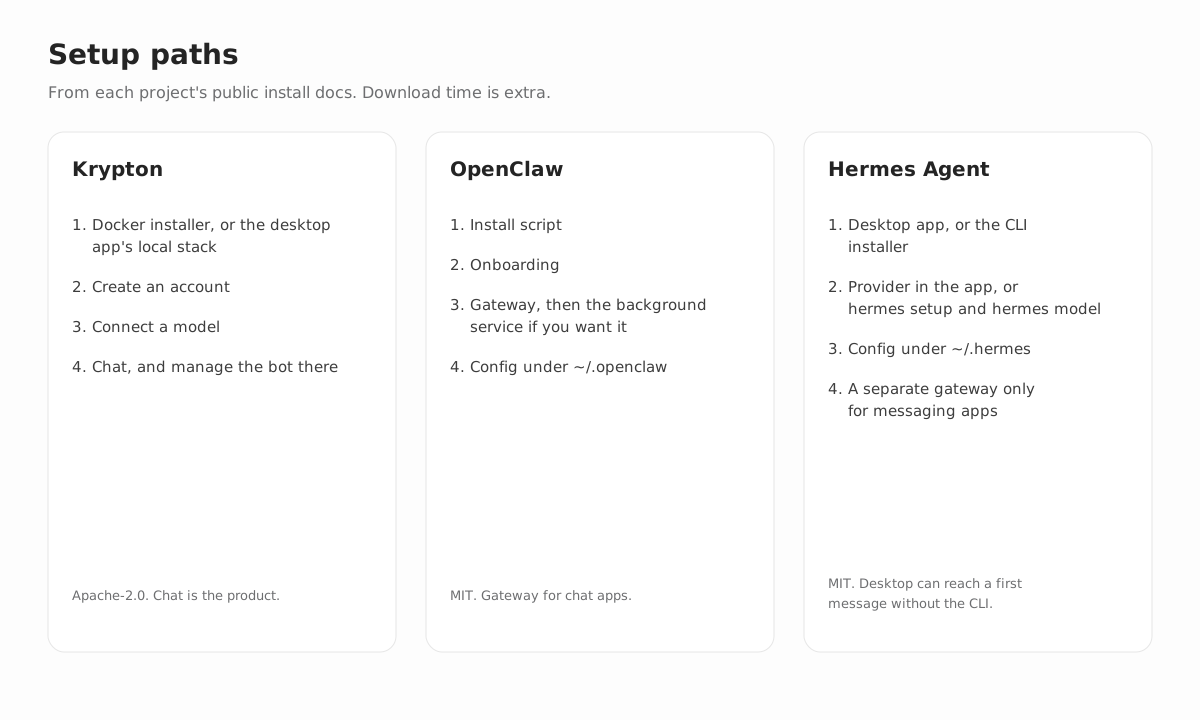
Krypton vs Hermes Agent, side by side
| Topic | Krypton | Hermes Agent |
|---|---|---|
| Setup | Install with Docker, or let the desktop app spin up the stack locally; then sign up and connect a model. After that it is only chat: each new bot interviews you, and that conversation is where you run it. | Desktop: in-app onboarding at first launch, where Choose provider later lets you skip that step. It reads the same ~/.hermes/ folder as the CLI and runs its own local backend. CLI: run hermes setup, then hermes model, then chat via hermes or hermes --tui. For messaging platforms, add hermes gateway setup and keep a gateway process running. |
| Day-to-day management | Manage the bot in the same chat on web, desktop, and mobile. Routines are readable Markdown that can run on a schedule, and the bot stops for approval at the boundaries you set. | Desktop settings handle providers, models, tools, credentials, MCP, and sessions. To recover, the CLI has hermes doctor, hermes gateway status, hermes setup, and hermes model. Chat apps rely on a gateway process that runs apart from the desktop's local backend. |
| Product | An open source home for persistent AI teammates, currently in beta. | Nous Research calls it a self-improving agent: it builds skills from experience, remembers across sessions, and runs scheduled jobs. The README also covers a terminal UI and a messaging gateway. |
| Source | Public on GitHub under Apache-2.0. | Public on GitHub under MIT, built by Nous Research. |
| Model | Any supported provider with credentials you bring, a custom model server included. Every bot can run a different model. | Pick a provider with hermes model. The quickstart names many, among them Nous Portal, OpenAI, Anthropic, Google, any custom OpenAI-compatible endpoint, and local servers like Ollama and LM Studio. It sets a minimum of 64,000 tokens of context. |
| Computer | Each bot gets a sandboxed desktop with a browser, terminal, and files. Docker on your own machine is the default, and you can swap in E2B, Daytona, CreateOS, Boat, or a trusted computer of your own. | The README lists seven terminal backends: Docker, SSH, Modal, Daytona, Singularity, Vercel Sandbox, and plain local. The quickstart uses hermes config set terminal.backend to switch to Docker or SSH. Inside Docker, Modal, Daytona, Singularity, or Vercel Sandbox, no dangerous-command check runs, per the security guide, since the container itself is the boundary. |
| Connections | Pick Composio or Pipedream Connect, or install your own Treg, remote MCP, or OpenAPI source. The server encrypts connector credentials, and the API never hands them back. | MCP servers go in config.yaml. On the project site you will also find vision, image generation, text-to-speech, web search, and browser automation, several of which come bundled in the Nous Portal Tool Gateway. |
| Where you talk to it | The Krypton web, desktop, and mobile apps. If you want them, optional connectors add Telegram, Slack, WhatsApp, Feishu/Lark, or iMessage through Sendblue. | Hermes Desktop is a chat window whose sessions are shared with the TUI and CLI. Through the gateway come Discord, Email, Signal, Slack, Telegram, WhatsApp, and more, and the desktop guide describes that gateway as a separate process. |
| Ongoing work | Every bot has its own conversations, memory, routines, and history, and can hand work to a peer bot or to a short-lived subagent. | Per the README, the agent curates its own memory, can write a skill once a task is done, schedules jobs with a built-in cron, and spawns isolated subagents. Results of scheduled jobs can be delivered to a connected platform. |
| Self-learning | While they work, bots record facts to memory by themselves. Every workspace starts with team rules: once a procedure has proven itself on real tasks, the manager bot captures it as a skill, and from then on any bot in the workspace can reuse it. You can see and edit both memories and skills in the app. | Nous Research describes a self-improving agent that turns experience into skills and keeps agent-curated memory across sessions, stored on whichever machine you install it on. |
| Approval | You draw the boundaries. When a task crosses one, the bot stops and asks first, and every action lands in an audit log. | The security guide covers approval for dangerous shell commands (approvals.mode is smart by default), checks on file writes, and allowlists for who may message the gateway. No dangerous-command check runs on container backends. Unattended sessions, cron included, reject those commands unless you change the setting. |
Why an open source, self-hosted agent
- Every line is public on GitHub under the Apache-2.0 license.
- Deploy from the published Docker images or straight from source, on hardware you control. The desktop app can launch that stack on your computer or connect to a server you already operate.
- Model credentials are yours to bring. Connector credentials stay encrypted on the server, and the API never returns them.
- Routines are Markdown you can read. Bots stop for your approval at the boundaries you set, and each action is written to an audit log.
- Web, Electron desktop, and Expo mobile are all clients of one API, so the same bots follow you everywhere.
Try Krypton your way
Self-host it on your own machine, or skip the setup with Krypton Cloud, now in beta.
Hermes Agent alternative: common questions
Is Krypton easier to install than Hermes Agent?
The documented routes differ. Self-hosting Krypton takes the Docker installer (or the desktop app starting the same stack), an account, and a model, and from then on the bot is managed only from its chat. Hermes Desktop can get you to a first message through in-app onboarding without the CLI, with providers and tools managed in Settings. The Hermes CLI route runs through hermes setup and hermes model, keeps config files in ~/.hermes/, and ends in a terminal chat. On either Hermes route, messaging apps add a gateway process.
Can Krypton stand in for Hermes Agent with no changes?
No. There is no importer for Hermes skills, config, or gateway sessions. Each is an open source agent you operate yourself, and they diverge on license, interface, and how much setup happens in a chat versus the Hermes CLI and desktop settings.
Does the software stay on my own machine with both?
For the software itself, yes. Krypton writes its database and all bot data to your host, while Hermes puts skills, memory, and config on the machine where you installed it, under ~/.hermes/ by default. Either way, prompts travel to the model provider you configure, and the Hermes site additionally sells optional cloud hosting and Nous Portal.
Where does the Hermes information come from?
The Hermes column condenses the Hermes Agent site, its quickstart, the configuration, security, and desktop guides, and the GitHub README. It refers to the Hermes Agent made by Nous Research, not a different product that happens to share the name. Confirm a command in those docs before you rely on it.